Background
In the Finished Goods (FG) shipping area, every pallet or box of goods ready for shipment always follows the same documentation procedure: each unit must be accompanied by an A4-sized Shipping Report Form containing two barcodes/QR codes:
- QR 1: Shipping details — shipping destination, batch reference, and document number.
- QR 2: Product identity — item code and part number.
The process had been running as-is, until a new quality compliance requirement changed everything. Management mandated that every outgoing unit must have its actual gross weight recorded and verified before dispatch — and that weight data had to be embedded into a physical 3rd QR code sticker that downstream stations and external ERP/WMS systems could scan to automatically ingest the complete shipment payload without any operator retyping.
The challenge was layered from day one:
- No integration between the A4 sheet and the physical scale. The existing A4 documentation system had no interface with the floor’s industrial weighing scales. The gap between paper and hardware had to be bridged from scratch.
- Scale data needed a strict verification sequence. Weighing couldn’t be done blindly — the system needed to confirm what product was on the scale first, then validate whether the captured weight was within allowable minimum and maximum gross limits before generating any QR output.
- Legacy digital scale systems had a serious architectural flaw. The facility already had several operational digital scale applications for other lines. Every one of them was built on database long-polling: Node.js would continuously write weight values into MySQL every few hundred milliseconds, while the Laravel UI would repeatedly query the same table to animate numbers on screen. The result was high database I/O load, CPU overhead, occasional database lock contention, and a sluggish, jittery experience on the operator screen.
- The project deadline was two weeks — and the physical PLC hardware hadn’t arrived yet. The Omron PLC module and load cell were still in transit from the vendor. Waiting for the hardware meant missing the deadline entirely.
Solution
Rather than retrofitting the legacy A4 documentation pipeline or repeating the same polling architecture mistakes, I designed an entirely new high-speed Industrial IoT intermediary station from the ground up.
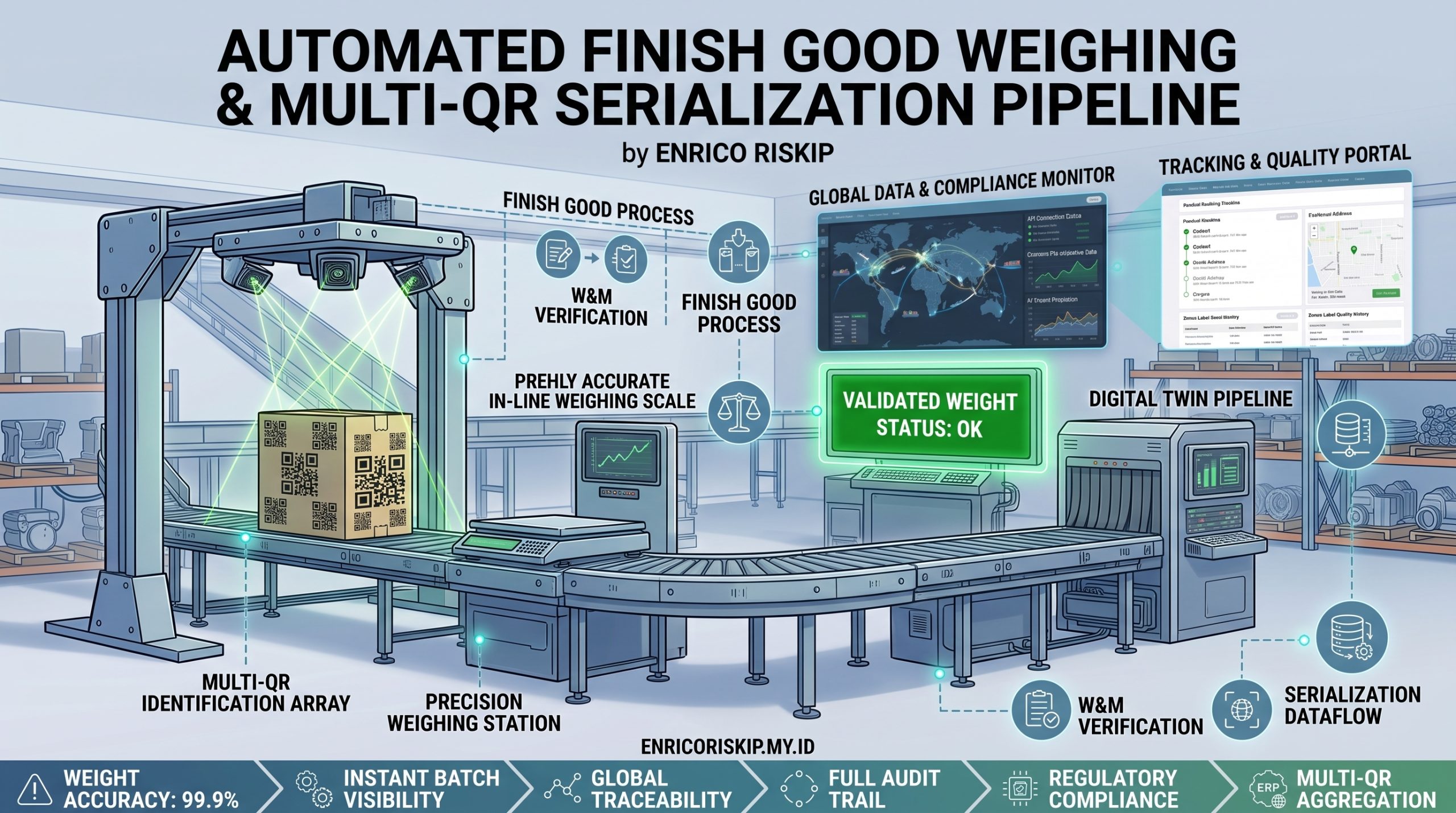
The system bridges the existing A4 shipping sheet with the industrial scale through a clean three-stage pipeline: scan and identify, weigh and validate, print and dispatch.
When the operator scans QR 1 and QR 2 from the A4 sheet, the system immediately validates the product identity and retrieves its weight tolerance thresholds. Only then does the scale unlock for weighing. The live weight reading is streamed in real time directly from the Omron PLC via Server-Sent Events — no database involved. The moment the scale stabilizes within the valid tolerance range, the system generates and prints a physical 3rd QR code label directly to the network printer via a raw TCP socket connection — bypassing operating system print dialogs entirely, in under 100 milliseconds.
The 3rd QR sticker is affixed to the package. At every subsequent station, operators scan this single sticker to submit the complete verified weight payload — product code, item name, actual gross weight, weighing timestamp, and station ID — directly into the central ERP/WMS system, with zero manual data entry.
To solve the timeline crisis, I built a custom Virtual FINS PLC Simulator — a standalone Node.js application that perfectly emulates Omron PLC hardware behavior over UDP, allowing 100% of the application logic to be developed, tested, and validated before the physical hardware ever arrived on site.
Implementation
Solving the Hardware Gap: A Custom Virtual FINS PLC Simulator
FINS (Factory Interface Network Service) is Omron’s proprietary industrial communication protocol. Through FINS over Ethernet (UDP/IP, port 9600), external systems can issue binary command frames to read and write PLC memory regions — specifically Data Memory (DM) registers and Word addresses — where load cell digitizers store weight status codes and measurement strings.
The challenge: without a physical PLC, the entire Node.js telemetry layer had no real signal to work with. Rather than blocking development, I spent the first day building a dedicated simulator that behaves exactly like an Omron PLC at the protocol level:
- Full FINS UDP Socket: Listens on port 9600 and responds to binary FINS frames — including Command
0101(Memory Area Read) and Command0102(Memory Area Write) — with correctly structured binary reply packets. - Dual-Line Virtual DM Register Map: Maintains a live virtual memory array for two scale lines simultaneously. Line 1 uses addresses
D1000(status) andD1010(real-time weight string); Line 2 mirrors atD2000andD2010. - Realistic Scale Physics Engine: A built-in “ladder scan” cycle runs every 100ms. When given a target weight, the simulator transitions through
US(Unstable) for a configurable settle period, then locks toST(Stable), replicating the exact behavior of a physical indicator.OL(Overload),HD(Hold), and network disconnect states are all programmable. - Weight String Encoding: All weight data is packed into ASCII strings matching the exact DM register format the real PLC produces:
ST,GS,+01200.0kg. - Web Controller (Port 8081): A standalone Tailwind CSS web interface provides push-button control over both scale lines — set target weight, force overload, force hold, simulate PLC disconnect and reconnect — without touching the terminal.
The result was a development environment that was completely indistinguishable from the real hardware at the application layer. When the physical PLC arrived weeks later, the integration required only adjusting the IP address and confirming the DM register map.
The Telemetry Gateway: FG-PLC-Monitoring-Server (Node.js)
The heart of this system is a dedicated Node.js microservice that acts as the exclusive bridge between PLC hardware and all client applications.
On a 100–500ms polling cycle, the gateway sends FINS read commands to the PLC, receives raw binary buffer responses, and decodes them into typed state objects — extracting status codes (ST/US/OL/HD), weight values, and online/offline flags. These decoded states are held in an in-memory state store (StateStore) that tracks changes and triggers events only when the data actually changes.
When state changes occur, the gateway broadcasts them as Server-Sent Events (SSE) — a lightweight, native HTTP streaming protocol — directly to any connected browser without touching the database. MySQL is written only when a weighing transaction is finalized and confirmed. A PushStrategy module manages the SSE client registry, handling connection lifecycles, sending initial state snapshots to new clients, and broadcasting multi-line telemetry to all active sessions simultaneously.
All API endpoints are protected by a shared internal secret key (X-Internal-Secret header or ?secret= query parameter), ensuring only trusted internal clients can trigger start, stop, and restart operations on the PLC polling service.
The Operator Workstation (Laravel 11 + Inertia.js + Vue 3)
Automatic Weighing Station
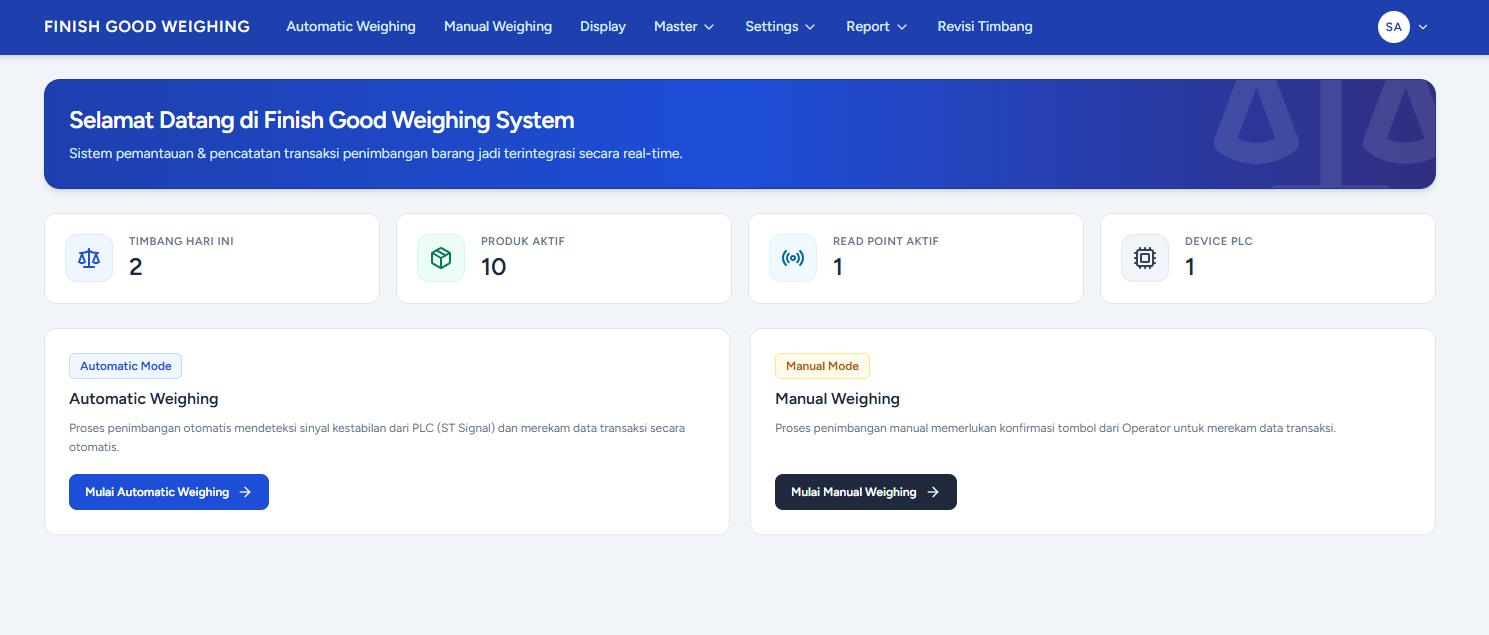
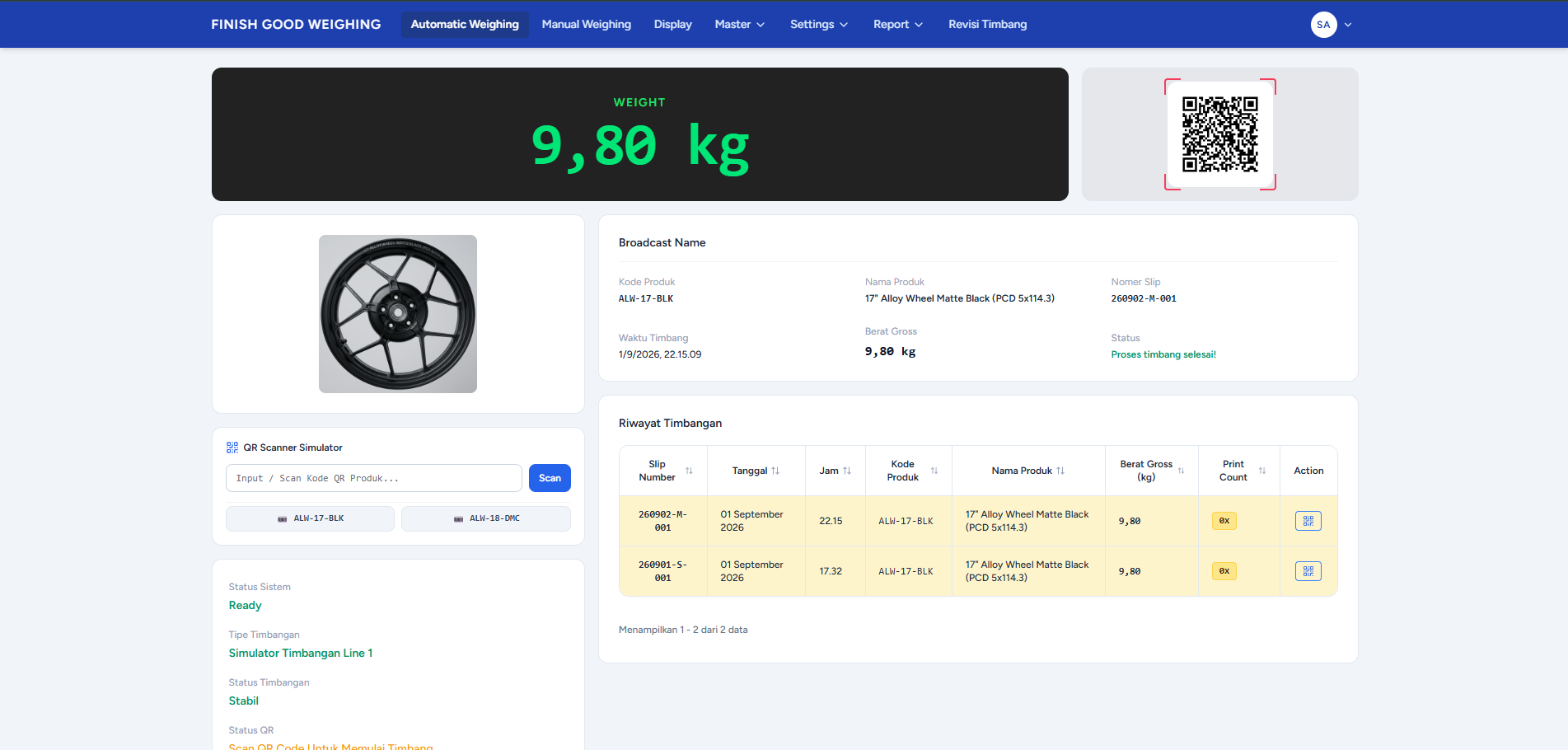
The primary operator module implements the full scan-weigh-print pipeline:
Smart On-Demand Product Caching: Loading thousands of product records on page mount would create unnecessary latency on every shift. Instead, the lookup is entirely demand-driven. When an operator scans QR 2 (the product code barcode), the system performs an instant async lookup, and the resolved product data is cached in session memory. Every subsequent scan of the same product returns instantly from cache with zero network round-trips.
Multi-Tier SSE Relay Architecture: The workstation opens a persistent SSE connection to the Node.js gateway on page load. Weight state changes stream directly into Vue reactive state without any polling or database interaction. The same module acts as a relay — it re-broadcasts the confirmed weight state via its own SSE endpoint to the Floor Display screen, forming a clean two-tier SSE pipeline: Node.js → Automatic Station → Floor Display.
Tolerance Enforcement & Automatic Lock: The moment the SSE stream reports a ST (Stable) status and the weight is within the product’s configured gross_min and gross_max thresholds, the system locks the weight value, marks the transaction as valid, and triggers the print sequence without any operator button press — if auto-print is enabled.
Manual Weighing Station: A fallback mode for cases where the automated SSE stream is unavailable. Manual entries require a mandatory reason code, ensuring every non-automated record is explicitly justified and audited.
Direct Socket Printing Engine (< 100ms)
Traditional browser printing — even when triggered silently — routes through the operating system print spooler, adds a print preview dialog, and introduces 3–5 seconds of latency. In a high-throughput dispatch environment, that overhead adds up to significant operational drag.
The solution was a driver-agnostic raw TCP socket printing engine implemented directly in PHP. When a print is triggered, the server opens a socket connection to the configured printer’s IP address on port 9100 and streams raw printer language commands:
- Zebra ZPL-II:
^XA...^BQN,2,5...^XZ - Sato SBPL:
<ESC>A...<ESC>2D30...<ESC>Z - TSC TSPL:
SIZE...QRCODE...PRINT 1,1
The 3cm × 3cm QR sticker — containing product code, item name, verified gross weight, weighing timestamp, and station ID — prints in under 100 milliseconds from the moment the transaction is confirmed.
The printer management module includes per-device IP/port configuration, raw TCP connection health checks (ping test), and calibration print triggers. Operators can manage multiple printer profiles (one per physical scale line) without touching any configuration files.
Dual-Line Scale Architecture & Hardware Bottleneck Prevention
The system natively supports two simultaneous scale lines. In production deployment, each line is assigned to a dedicated workstation PC — a deliberate architectural choice to eliminate printer queue contention. If Line 1 and Line 2 shared a single printer, back-to-back high-volume weighing events would create a new bottleneck at the print spooler.
When auto-print is disabled — during testing or low-traffic periods — the dual-line configuration requires no additional hardware. Opening two browser tabs on a single machine is sufficient to operate both lines independently.
Activating a new scale line is fully self-service: add the new read point configuration in the Master Read Point module (IP, DM register address, word count, memory area), and select the appropriate line at login. No code changes required.
Shift-Aware Audit Trail & Revision Ledger
Every weighing transaction generates an immutable ORIGIN record. Subsequent corrections create LIVE EDITED or DELETED entries linked to the original, carrying operator name, timestamp, and a mandatory reason field. No record is ever destructively overwritten.
All reports, exports, and historical aggregations respect the factory’s 18:01 shift cutoff boundary — ensuring that late-shift weighing events are correctly attributed to the right shift group, regardless of calendar date. Excel exports (via Laravel Excel) mirror this grouping, and headers reflect the shift period rather than raw dates.
Other Platform Modules
- Default Settings Module: Supervisors can configure system behavior — auto-print toggle, auto-reset delay, default scale line, scanner prefix/suffix patterns, and weight tolerance defaults — entirely through the UI, with no application deployment required.
- Master Product Management with Auto Image Compression: Product catalog management with server-side automatic image compression to WebP format, keeping asset sizes lean for floor workstation bandwidth.
- PLC Device & Read Point Management: Dynamic configuration of PLC device IPs, FINS ports, memory areas (DM/CIO), register addresses, and polling word counts from the admin dashboard.
- Communication Log Viewer: A paginated log of all PLC telemetry events, offline detections, recoveries, overload events, and system boot/stop/restart records — automatically written by the
EventLoggerservice listening to state transitions in the Node.js gateway. - User Management & Role-Based Access Control: Multi-role access management with operator, supervisor, and administrator permission tiers.
Impact
- Delivered on Schedule in 2 Weeks. The custom FINS PLC simulator made it possible to complete, test, and validate 100% of the application logic before the physical hardware arrived — the only integration step remaining was IP configuration.
- 0% Weight Transcription Errors and Dispatch Mismatches. Mandatory QR product identification before weighing and automatic tolerance enforcement removed every manual data entry touchpoint from the classification-to-dispatch workflow.
- 85%+ Reduction in Label Print Latency. Direct TCP raw socket printing reduced print turnaround from 3–5 seconds to under 100 milliseconds — eliminating the single biggest friction point in the operator’s per-unit workflow.
- Measurable Database Performance Improvement. Replacing database long-polling with Server-Sent Events eliminated thousands of redundant queries per minute, removing database lock contention and freeing up server resources across the board.
- End-to-End Digital Traceability Across All Shifts. Every printed 3rd QR sticker is permanently linked to the originating A4 batch reference, live scale telemetry log, operator identity, and shift period — making audits straightforward and indisputable.
Live Demo
- Workstation — https://fg.enricoriskip.my.id/
- (User:
superadmin/ Pass:password) - (User:
operator/ Pass:password)
- (User:
- PLC Simulator — https://fg-plc-sim.enricoriskip.my.id/
📌 NoteCurious about how this project was actually implemented on the ground — from building a PLC simulator because the hardware hadn’t arrived yet, to a TX/RX cable mix-up drama during the first trial, to a subnet issue that briefly kept the server from talking to the PLC? Read the full story (in Indonesian) at Implementasi Finish Good Weighing.